Overview
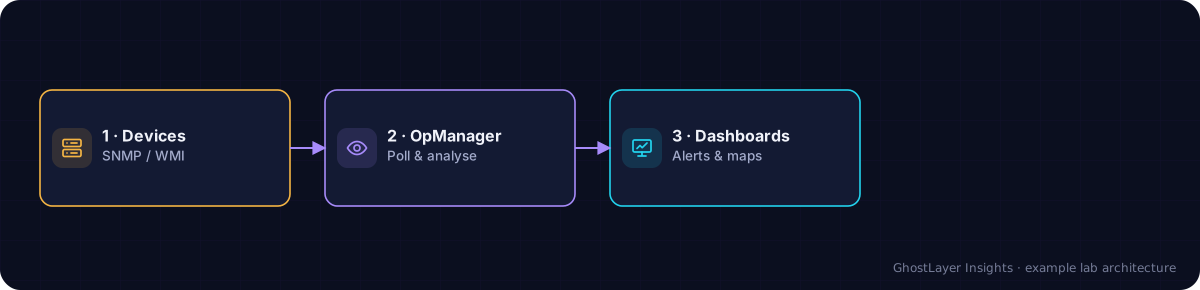
ManageEngine OpManager, from the ManageEngine division of Zoho, is a monitoring platform for networks, servers and virtual infrastructure. It uses standard protocols such as SNMP and WMI to track availability and performance, raise alerts, and visualise the environment through dashboards and maps.
| Attribute | Summary |
|---|---|
| Vendor | ManageEngine (Zoho) |
| Category | Network Monitoring |
| Deployment | On-premises (and cloud options) |
| Licensing | Commercial (per device / interface tiers) |
| Best for | Affordable, broad network and server monitoring |
Select any component in the diagram to read what it does.
Text description of this diagram
OpManager polls devices using standard protocols, then analyses the data and presents alerts, dashboards and maps.
Key features
- Availability and performance monitoring for network devices, servers and VMs.
- SNMP, WMI and other standard protocols for broad device support.
- Dashboards, network maps and customisable alert thresholds.
- Fault and alarm management with multiple notification channels.
- Add-on modules such as network configuration management (NCM).
Strengths
- Affordable compared with many enterprise monitoring suites.
- Broad device and vendor support out of the box.
- Relatively quick to set up and get value from.
- Extensible through add-on modules as needs grow.
Limitations to weigh
- Interface and dashboards can feel dated next to some newer rivals.
- Very large or complex environments may need careful scaling and tuning.
- Some advanced capabilities come as separate add-on modules.
Deployment options
OpManager is most commonly deployed on-premises on a Windows or Linux server, with distributed and failover options for larger environments, and cloud-hosted options are also available.
Integrations
- IT service-management and ticketing tools for alert workflows.
- Other ManageEngine products for a wider IT-management suite.
- APIs and standard protocols for custom integration.
Licensing
OpManager is licensed commercially, typically based on the number of devices or interfaces monitored, with editions that unlock additional features. Confirm current editions, device tiers and pricing with the vendor.
Ideal use cases
- Small-to-mid-sized IT teams needing cost-effective monitoring.
- Organisations wanting broad coverage of mixed network and server estates.
- Teams that value quick setup over deep customisation.
This is an independent editorial overview based on publicly available vendor documentation and general industry knowledge. It is a demonstration review: it is not a paid placement, a hands-on lab test, or a benchmark, and it does not assign a numeric rating. Always confirm current specifications, licensing and pricing with the vendor before making a decision.