
Phishing is the most common way attackers get in — and the good news is that a trained eye can spot most of it.
What is it?
Phishing is a fake message — usually an email, text, or chat — designed to trick you into revealing information (like a password), clicking a harmful link, or opening a malicious attachment. It pretends to come from someone you trust.
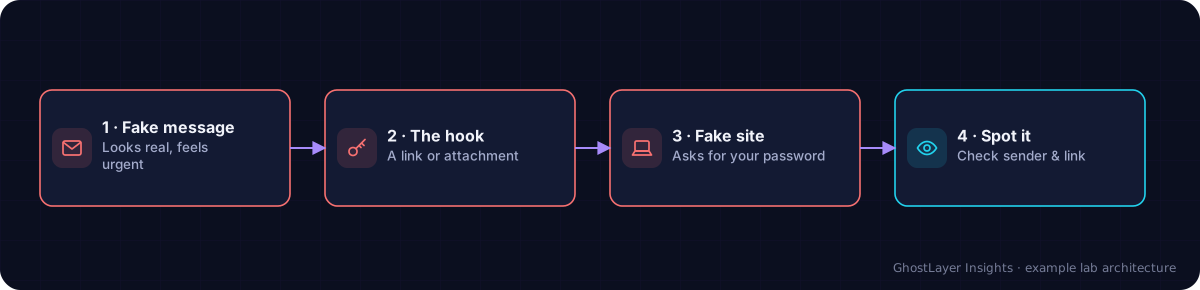
Select any component in the diagram to read what it does.
Text description of this diagram
Phishing uses a fake but convincing message to trick you into giving away logins or money.
Why is it important?
A large share of all breaches begin with a phishing message. Attackers favour it because it targets people, who are often easier to trick than well-maintained technology. Learning the warning signs is one of the most valuable skills in this course.
How does it work? — the warning signs
- Urgency or fear — “Your account will be closed in 24 hours!”
- Unexpected requests — for passwords, payments, or personal details.
- Odd sender address — a name you know but a strange email address behind it.
- Links that do not match — hover to see the real destination before clicking.
- Spelling and grammar mistakes, or a greeting like “Dear Customer”.
When in doubt, do not click. Contact the company directly using a number or website you already trust — never the contact details in the suspicious message.
A real-world example
An employee gets an email that looks like it is from their CEO, marked urgent, asking them to buy gift cards and send the codes. The address is subtly wrong and the tone is pushy. Recognising the urgency and odd request as classic phishing signs, they report it instead of acting — and avoid a costly scam.
Check what you learned
What is phishing?
A fake message designed to trick you into revealing information, clicking a harmful link, or opening a malicious attachment, by pretending to be someone you trust.
Name two common warning signs of a phishing message.
Any two of: a sense of urgency or fear, unexpected requests for sensitive info, an odd sender address, mismatched links, or poor spelling and generic greetings.
Key takeaways
- Phishing uses fake, trusted-looking messages to trick you.
- Watch for urgency, unexpected requests, and odd senders or links.
- When unsure, do not click — verify through a channel you already trust.
▶ See it in action: Watch the Phishing Attack simulation →