Welcome to Module 4, where we look closely at the threats you will actually meet. We start with the broadest one: malware.
What is it?
Malware is short for “malicious software” — any program written to cause harm. It is the umbrella term that covers viruses, worms, trojans, spyware, and more.
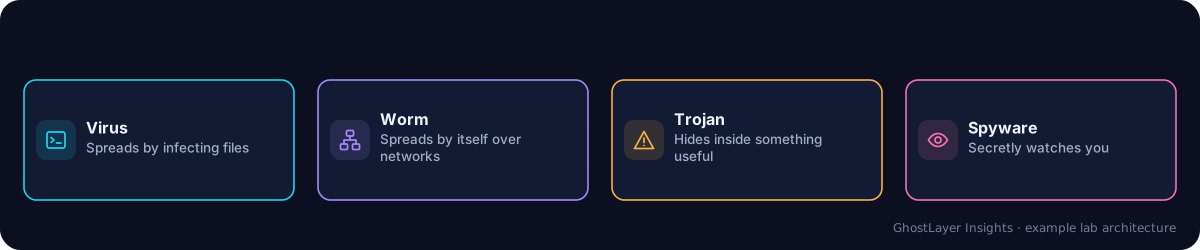
Select any component in the diagram to read what it does.
Text description of this diagram
Malware is any software written to cause harm. It comes in several forms.
The main types
- Virus — attaches to a file and spreads when that file is opened or shared.
- Worm — spreads by itself across networks, no user action needed.
- Trojan — pretends to be useful software to trick you into installing it.
- Spyware — secretly watches what you do and steals information.
- Ransomware — locks your files and demands payment (its own lesson is next).
Why is it important?
Malware is behind a huge share of attacks. Once it runs on your device, it can steal data, spy on you, damage files, or give an attacker control. Knowing the types helps you understand how each spreads — and therefore how to stop it.
How does it work?
Malware usually needs a way in: a malicious email attachment, a fake download, an infected USB stick, or a software weakness. Once it runs, it tries to do its job and often to spread further. Antivirus software and keeping programs updated block most common malware.
A real-world example
A “free” copy of a paid program downloaded from a random website turns out to be a trojan. It installs the promised app — but also quietly installs spyware that records the user’s banking logins. The lesson: only install software from sources you trust.
Check what you learned
What does the word malware mean?
Malicious software — any program written to cause harm.
What is the difference between a virus and a worm?
A virus needs a user to open or share an infected file to spread; a worm spreads by itself across networks with no user action.
Key takeaways
- Malware is any software written to cause harm.
- Types include viruses, worms, trojans, spyware, and ransomware.
- Updates, antivirus, and trusted sources stop most malware.