
Every other lesson is about preventing an attack. This one is about surviving it. Backups are what let you recover when something still goes wrong.
What is it?
A backup is a spare copy of your important data, kept somewhere safe. Recovery is restoring from that copy after data is lost, damaged, or locked. Backups are a corrective control (from Module 3) — they fix the damage after the fact.
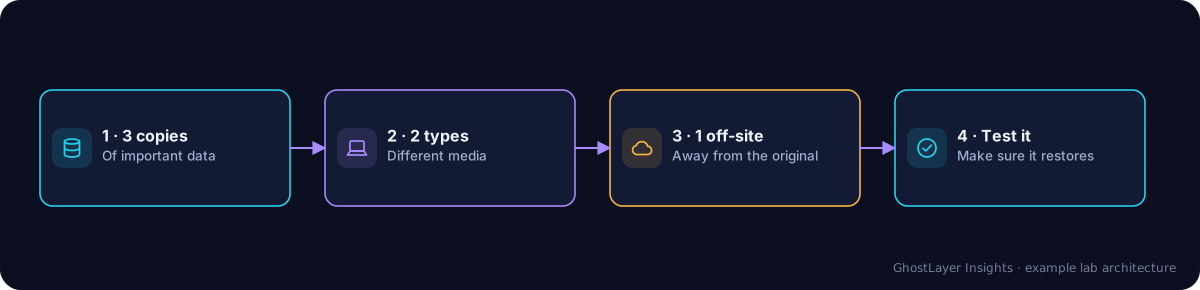
Select any component in the diagram to read what it does.
Text description of this diagram
Backups are copies of your data you can restore if the original is lost, encrypted or damaged.
Why is it important?
Ransomware, a failed hard drive, a lost laptop, or an accidental deletion can wipe out data in an instant. If you have a good backup, these become an inconvenience instead of a disaster — which is exactly why backups are the top defence against ransomware.
How does it work? — the 3-2-1 rule
A simple, trusted rule for safe backups:
- 3 copies of your important data.
- 2 different types of storage (for example an external drive and the cloud).
- 1 copy kept off-site or offline, away from your main device.
A backup that is always connected can be encrypted by ransomware along with everything else. At least one copy should be offline or otherwise out of reach — and you should test that a backup actually restores.
A real-world example
Two small businesses are hit by the same ransomware. The first has no backups and faces losing everything or paying criminals. The second restores from an offline backup made the night before, loses only a few hours of work, and never pays a cent. Same attack, completely different outcome — decided by one backup.
Check what you learned
What is the 3-2-1 backup rule?
Keep 3 copies of your data, on 2 different types of storage, with 1 copy kept off-site or offline.
Why should at least one backup be offline or off-site?
So that ransomware or a local disaster cannot reach and destroy every copy at once.
Key takeaways
- Backups are spare copies that let you recover from disaster.
- Follow the 3-2-1 rule, with one copy offline or off-site.
- Backups are the strongest defence against ransomware — and test them.