
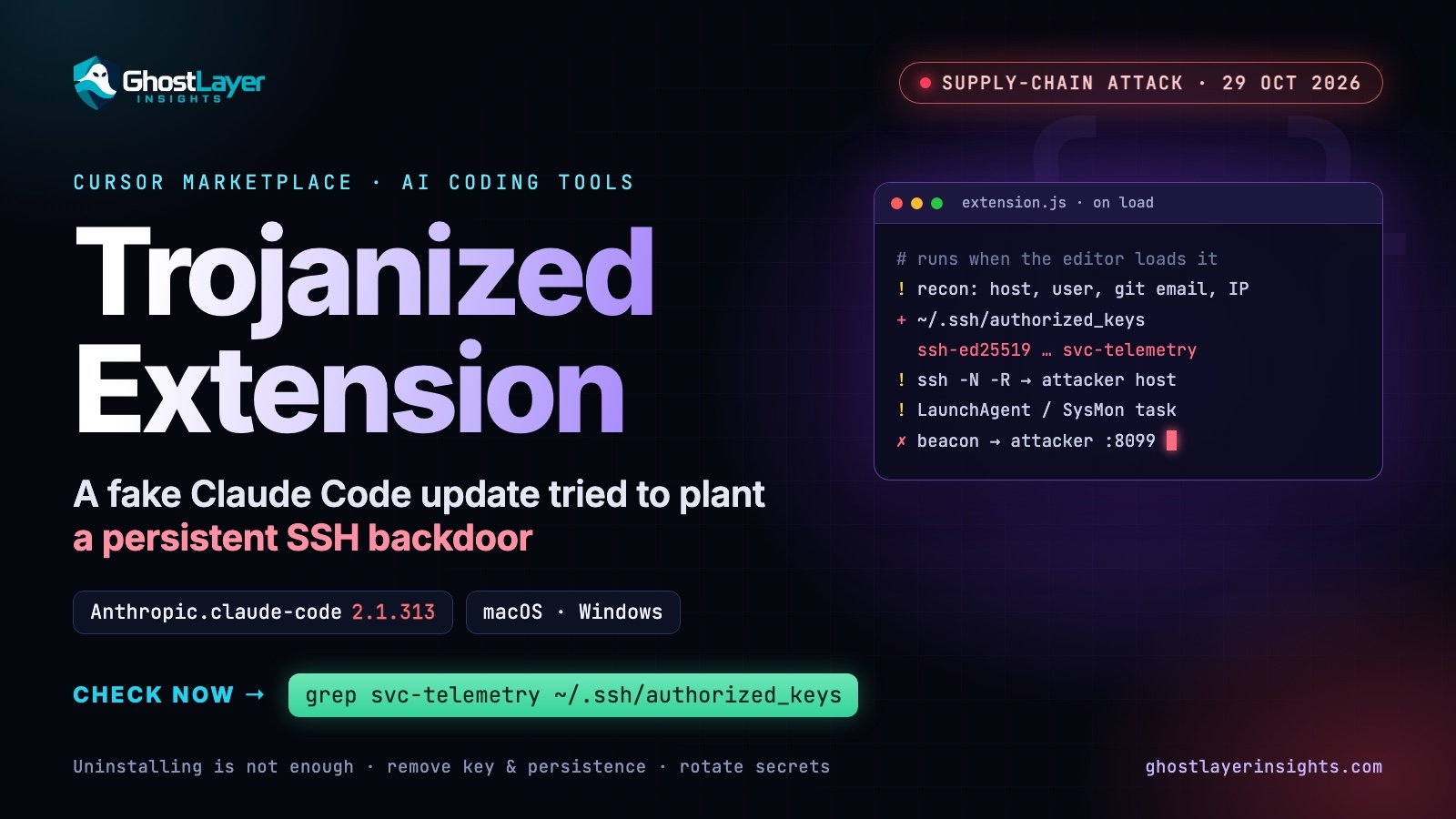
In short: for about 11 hours on 29 October 2026, Cursor’s extension marketplace served a malicious build of the Claude Code extension (Anthropic.claude-code, version 2.1.313; Cursor’s notice also lists 2.1.312). It ran as soon as it loaded, sent details about the computer to an attacker, and tried to plant a persistent SSH backdoor on macOS and Windows machines. If you use Cursor, check for an SSH key labelled svc-telemetry — the steps are below.
What happened
- When: from about 2:27 a.m. to 1:35 p.m. Pacific Time on 29 October 2026.
- Where: only the Cursor extension marketplace. Early reports also named npm, Open VSX and Microsoft’s Visual Studio Code Marketplace; that was later corrected — Cursor was the only source of the malicious build.
- What: a trojanized update of the official extension ID
Anthropic.claude-code. Cursor states that these versions were not developed by Anthropic. - Who: Windows (
win32-x64) and macOS (darwin-arm64) users who installed or auto-updated the extension during the window — reported as up to about 5,000 users. - Response: Cursor removed the build, temporarily shut down and rebuilt its marketplace, audited it (finding no other tampered extensions), rotated its keys and had the attacker’s server taken offline.
- Still unknown: how the attacker managed to publish under the legitimate extension’s identity. No attribution has been made public.
How the malicious extension worked
Researchers at OX Security found a malicious loader added to the start of the extension’s extension.js; the rest of the real Claude Code extension was left in place, so it still looked and behaved normally. The loader ran automatically when the editor loaded the extension — no click needed — in five stages:
- Reconnaissance — collected the hostname, user name, operating system, home directory, working directories, Git e-mail address and public IP address.
- SSH key implant — appended an attacker-controlled
ssh-ed25519key, labelledsvc-telemetry, to the user’sauthorized_keysfile. - Turn on SSH and open a reverse tunnel — tried to enable the computer’s SSH server and open a reverse SSH tunnel to the attacker’s server, so the attacker could log in from outside.
- Persistence — installed a macOS LaunchAgent or a Windows scheduled task (with a Startup-folder fallback) that retried the tunnel about every 60 seconds, independently of the editor.
- Beacon — reported the host details and backdoor status to the attacker’s server.
The good news: enabling an SSH server needs administrator rights, which the extension normally does not have, and the code contained errors. Cursor says the remote-access step would fail on most computers unless Cursor itself was running as administrator. But the computer details were still sent, and the unauthorised key and persistence could still be installed — so every machine that received the update must be checked.
Why this matters for developers using AI coding assistants
- Extensions run with your permissions. An editor extension can read your files, run commands and reach the network as you.
- Auto-update trusts the publisher name. This build arrived as a normal update to a trusted, official extension — there was nothing unusual to click on.
- Developer machines are high-value targets. They hold SSH keys, Git and cloud credentials, API keys and access to production systems.
- It is a software supply-chain attack. The attacker targeted the distribution channel rather than each victim — the same pattern as poisoned npm and PyPI packages.
Am I affected? How to check
Check every computer that runs Cursor with the Claude Code extension and could have updated it on 29 October 2026.
1. Look for the attacker’s SSH key
macOS (Terminal) — the check published by Cursor:
grep -qs svc-telemetry ~/.ssh/authorized_keys && echo "svc-telemetry key found" || echo "No key found; machine not impacted"Windows (PowerShell) — checks both places Windows OpenSSH reads keys from:
Select-String -Path "$HOME\.ssh\authorized_keys","C:\ProgramData\ssh\administrators_authorized_keys" -Pattern 'svc-telemetry' -ErrorAction SilentlyContinueNo output on Windows means the key was not found.
2. Look for the persistence files
# macOS
ls -la ~/Library/LaunchAgents/com.apple.sysmond.plist ~/.config/.smt ~/.config/.smtk 2>/dev/null
# Windows (PowerShell)
Get-ScheduledTask -TaskName SysMon -ErrorAction SilentlyContinue
Test-Path "$env:APPDATA\Microsoft\Windows\Start Menu\Programs\Startup\sysmon.cmd"
Test-Path "$env:USERPROFILE\.config\smt.cmd"Note that com.apple.sysmond and SysMon are names chosen to look like legitimate system components.
3. Check the extension version and network logs
- In Cursor’s Extensions view, check whether Claude Code is or was at version 2.1.312 or 2.1.313, and update to the current clean version.
- Search firewall, proxy, DNS and EDR logs for connections to
134.209.82[.]225on TCP 22 (SSH) or 8099 (beacon).
If you find signs of compromise
- Isolate the computer from the network.
- Follow Cursor’s remediation instructions and scripts (
remediate-macos.shrun as the affected user, not root;remediate-windows.ps1from an elevated PowerShell). - Remove the unauthorised key, the persistence items and any running tunnel (
ssh -N -Rorautosshprocesses). Uninstalling the extension alone is not enough. - Rotate every secret the machine could reach — SSH keys, Git tokens, cloud and API keys — and sign out of active sessions, working from a different, trusted computer.
- Consider rebuilding the machine from a clean image, especially if Cursor ran with administrator rights.
Indicators of compromise
From Cursor’s notice and OX Security’s analysis. IP addresses are defanged; use them for searching, not visiting.
| Type | Indicator |
|---|---|
| SSH key label | svc-telemetry |
| Unauthorised key fingerprint | SHA256:0Z6R+DF64Do2nwQic8a7kkfDLNNk4IiK+2U2Rci4htk |
| Attacker host | 134.209.82[.]225 — TCP 22 (tunnel), 8099 (/beacon) |
| macOS persistence | ~/Library/LaunchAgents/com.apple.sysmond.plist, ~/.config/.smt, ~/.config/.smtk |
| Windows persistence | Scheduled task SysMon; Startup\sysmon.cmd; %USERPROFILE%\.config\smt.cmd |
| VSIX SHA-256 (macOS) | 432ccdee3801f99e52b8fe31f69ea9870118e96ea7ef9ecabed1479621b5ab62 |
| VSIX SHA-256 (Windows) | 3de1722901165769893bef57c72594e9a54459faa23f3091b136b79966edd081 |
| Command strings | ssh -N -R, autossh -M 0, schtasks /create /tn SysMon, systemsetup -setremotelogin on |
Lessons for teams
- Control extensions like any other software: keep an allow-list, and in sensitive environments pin versions or delay automatic updates so a bad release can be caught first.
- Never run your editor as administrator. Here, that single habit was what stopped the backdoor from working on most machines.
- Monitor
authorized_keys. A new key on a developer laptop is rarely legitimate. File integrity monitoring catches it — see our Wazuh tutorial for a step-by-step setup. - Alert on outbound SSH from workstations, and on new scheduled tasks or LaunchAgents created by editor processes.
- Keep secrets off developer machines where possible: short-lived credentials, hardware-backed SSH keys and a secrets manager limit what a compromised laptop exposes.
Sources
- Cursor: Security notice — malicious version of Anthropic.claude-code identified in the Cursor Extension Marketplace
- OX Security: Compromised Claude Code extension (2.1.313) plants attacker SSH key and persistence
- The Hacker News: Official Claude Code extension on Cursor Marketplace trojanized with persistent SSH backdoor
- BleepingComputer: Malicious Claude Code extension on Cursor planted SSH backdoors
- Help Net Security: Claude Code extension poisoned with persistent SSH backdoor
Leave a Reply